FieldJockey
Log the day. Pin every issue.
Send the report.
Daily logs, punch lists and inspections on your phone, turned into reports people act on.
Trials open December 2026

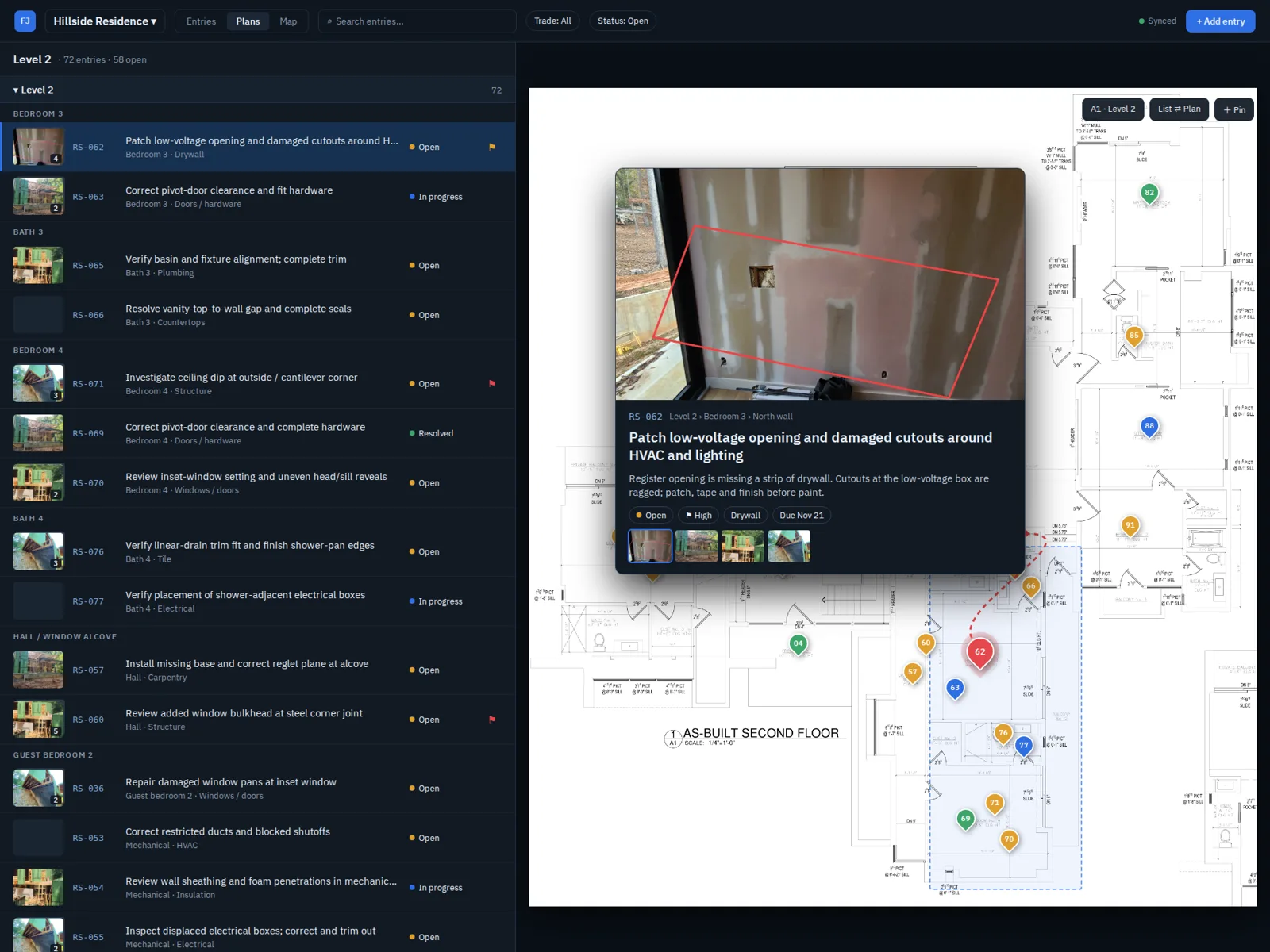
Captured on the phone. Finished at the desk.
Log the day and capture every issue where you find it. Organize the whole job on a big screen. Send each person exactly their part, without retyping a thing that night.
Capture on the walk
One entry per issue: photos, the observation, next steps, status, severity, trade and due date. Hold the mic to dictate. Entries file under floor, room and surface, so a 200-item walk stays readable.
Pin it on the plans
Load the PDF plan set and drop each issue on the sheet where it is. Assign sheets to floors, draw zones, see every pin at once, and flip between the list and the plan.
Mark up and sketch on your phone
Arrows, outlines, pen, text and dimensions that snap and line up as you draw, plus a grid page for quick sketches. Set the scale from a known dimension and measure right on the plan or photo. The original photo is always kept untouched.
Reports people act on
Your logo and standard opening and closing text. Compact rows with photos and a zoomed crop of the plan. Capture a signature for sign-off. Download a PDF, a password-protected PDF, or a single web page that opens offline.
Send each trade their scope
Filter by trade, area or status and send it as a link, for pricing, punch-out or follow-up. Add a password, expiry date or "prepared for" watermark, and revoke it any time. Internal notes never leave your team.
Your files, your way
Open plans and photos from Google Drive, Dropbox or your device. Work on local files with no account, or sign in for cloud backup and sync between phone and desktop. Export issues to PlanJockey.
Keep the daily log
One card per day on every job: weather, crew by trade, work done, deliveries, visitors, delays and photos. Send the log for the day or the week as a PDF or a link.
A project portal for owners
On Plus, give owners and stakeholders one live link per project with the reports, log and photos you choose. Put it on your own website, add named viewers, and send daily or weekly digest emails.
Bring your own AI agent
Your project data is yours and open to the agent you choose. Connect a compatible AI agent through MCP, pick which projects it can see and whether it can only read or also mark items resolved, and disconnect any time. It can send open items to the task tool your team already uses, so FieldJockey stays the record, not another task list.
How it works
Walk
Snap the photo, say what you see, drop the pin, and log the day. It works in basements and on rural sites with no bars, and backs itself up when you get signal.
Organize
On the desktop, the list, the plan sheets, the daily log and the map show the whole job with its photos. Set trades and due dates, and review every day at a glance.
Report
Send the owner a branded report or a live project portal, and each trade their own scope. The walk is the report.
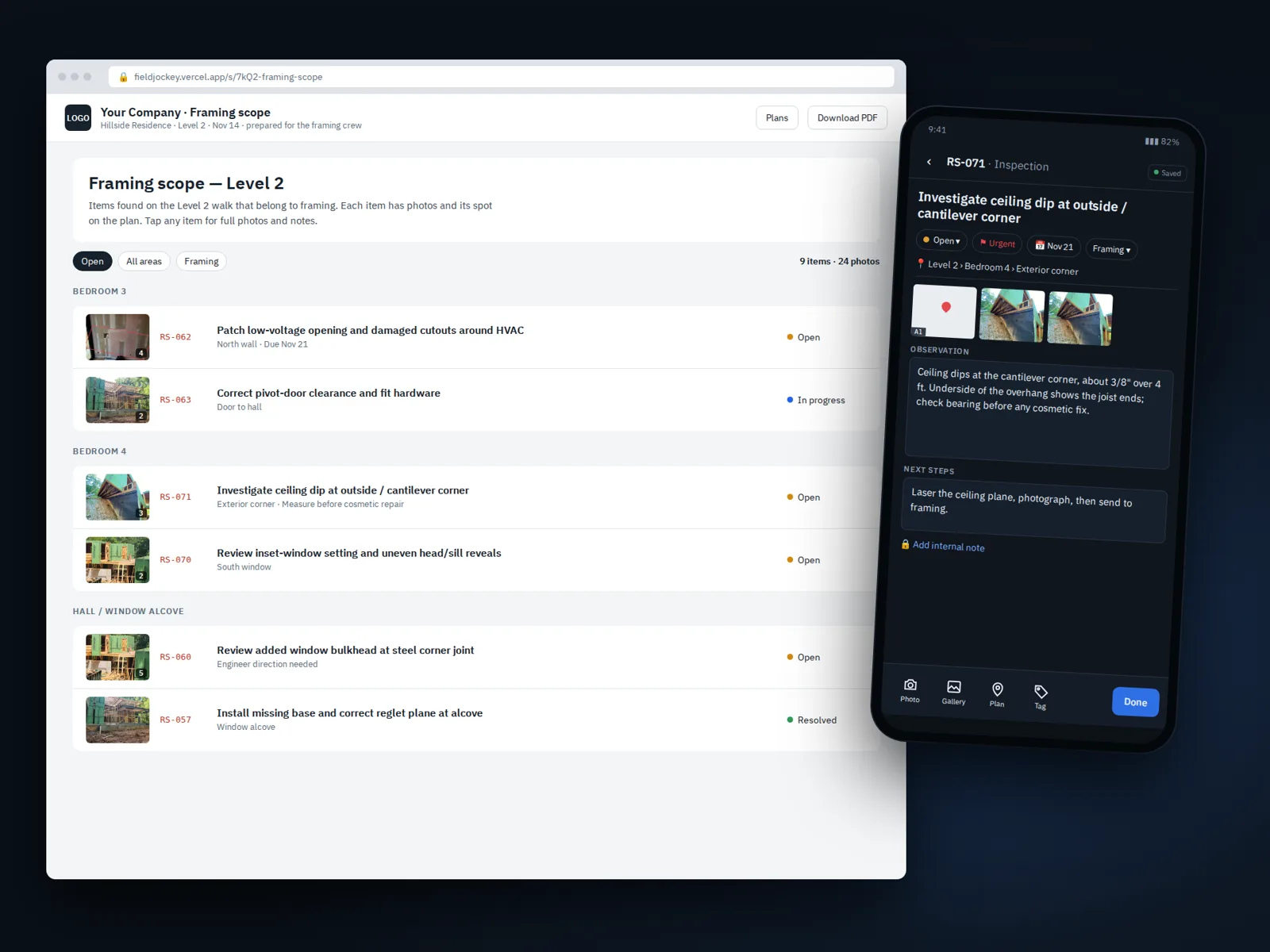
A framing scope sent as a link, next to the entry it came from on the phone.
Everything to document the job. Plus adds the owner portal.
Photos at full resolution, always. FieldJockey has every tool for logs, issues, markup and reports. Plus adds a live portal for owners and stakeholders, digest emails, a view across all your jobs, and ten times the storage.
14 days free
Every feature, Plus included, no card needed. Trials open December 2026.
Your work is never locked away
After the trial, open your projects and download your reports at no cost.
The people you send to never pay
Subs, owners and clients open your links in a browser. No account, no app.
FieldJockey
$15 per person / month
or $150 per year (2 months free)
Daily logs, punch lists, inspections, phone markup, branded reports and share links. 50 GB of photo storage, about 35 to 50 large-home walks.
Request trial accessFieldJockey Plus
$25 per person / month
or $250 per year (2 months free)
Everything in FieldJockey, plus a live project portal, owner and stakeholder access, digest emails and a view across all your jobs. 500 GB of photo storage, about 350 to 500 large-home walks.
Request trial accessBoth include the daily log, capture, plan pins, phone markup, branded reports, share links, phone-to-desktop sync, and access for your own AI agent. Full storage never deletes anything: new uploads pause until you upgrade or archive a finished job to a file.
How it compares
| FieldJockey | Fieldwire Pro | PlanRadar Basic | |
|---|---|---|---|
| Entry paid plan, one person | $15/month, or $150/year | $39/month, billed yearly | $32/month |
| Plan sheets | Your whole plan set | Unlimited | 10 |
| What it is | Daily logs, punch lists and inspections: plan pins, phone markup and branded reports | Plans, tasks and punch lists for construction teams | Defects, tickets and reports on plans |
Other products' prices and limits are from each vendor's pricing page, read November 15, 2026, at their entry paid plan. Product names are trademarks of their owners.
Builders and superintendents
Keep the daily log, run the punch walk once, and hand every trade a list they can act on.
Project managers and remodelers
Scope walks before pricing, progress checks during, warranty visits after.
Inspectors and consultants
Findings pinned to the plan with dated photos, in a report clients actually read.
Architects and engineers
Construction administration on your own drawings: site observation reports, field reports and punch lists at substantial completion, each finding pinned with a dated photo.
Owner's representatives
Site visits documented room by room, with a clean record of what was found and when, and a portal the owner can check any time.
How teams use it
FieldJockey is useful every day on the job, not just at the punch walk.
Builders: the daily log and the punch walk
One app for the record of every day on site and the walk at the end, with each trade getting only its own list.
Read the use case →Architects and engineers: construction administration
Site observation reports and punch lists at substantial completion, pinned to your own drawings.
Read the use case →